
Calgary: 403-270-7425 Grande Prairie: 780-538-2744 High River: 403-652-7721 Lethbridge: 1-866-402-5552


Change ReSound Receiver-in-Canal WG
How to Change ReSound Receiver-in-Canal (RIC) Wax Guards – Soundwave Hearing Care
For this video, we’re going to show you how to change your wax guard on your ReSound receiver-in-canal, or RIC, hearing aid.

If your hearing aid is fully charged or you have a new battery in it and you feel like the hearing aid is either incredibly weak or soft or not working at all, this should always be your first line of defence.
What you need to do is grab your hearing aid and remove this little silicone cap.
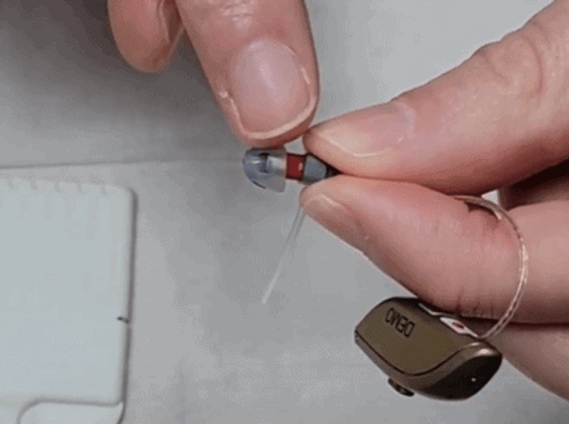
To do that, I recommend giving it a little pinch and pulling it off.
As you can see, we have exposed a little white wax filter. If there is a little bit of wax or moisture in there, it will plug and prevent the sound from coming out.

So, to replace this, you’re going to take your wax guards and some replacements.

You’re going to just take one of these little black sticks out of the case. What you may see is a little sharp end on one side and a replacement filter on the other.

What you need to do is hold the hearing aid firmly and, with the sharp end, gently push in and pull out. As you may notice, the filter has been removed from the hearing aid.

You’re going to flip it around and push it right back in. Now that you have replaced the filter, this little stick will just get discarded. The next step is to put this dome back on. As you can see, there’s a little circle within the larger circumference.

You’re going to line it up and push it on and I always recommend giving it a little tug. And now your hearing aid will hopefully work.
Calgary and Alberta Hearing Aids
At Soundwave Hearing Care, we offer hearing aids and other management techniques so that you can hear the world around you more clearly. To make an appointment with an audiologist, get in touch with Soundwave Hearing Care right away.
Transcript
For this video, we’re going to show you how to change your wax guard on your ReSound receiver-in-canal, or RIC, hearing aid.
If your hearing aid is fully charged or you have a new battery in it, and you feel like the hearing aid is either incredibly weak or soft or not working at all, this should always be your first line of defence.
What you need to do is grab your hearing aid and remove the silicone cap to expose the white wax filter.
Using the sharp end of the guard stick, gently push in and pull out the old filter, flip it around, push the replacement filter in, discard the stick, then replace the silicone dome.
Give it a little tug. Now your hearing aid should work.
How To Videos

How to Change a Hearing Aid Battery

How to Change a Wax Guard for a Custom Hearing Aid

How to Change Phonak Receiver-in-Canal (RIC) Wax Guards

How to Change ReSound Receiver-in-Canal (RIC) Wax Guards

How to Change Starkey Receiver-in-Canal (RIC) Wax Guards

How to Charge ReSound Receiver-in-Canal (RIC) Hearing Aids

How to Pair ReSound Hearing Aids to an Android Cellphone

How to Pair Phonak Hearing Aids to an Android Cellphone

How to Charge Starkey Receiver-in-Canal (RIC) or Behind-the-Ear (BTE) Hearing Aids

How to Pair ReSound Hearing Aids to an iPhone


